I Built a Website With AI: What Worked, What Failed, and What I Learned
The promise of AI website builders is appealing: describe what you want, let the software generate a website, and make changes through simple instructions instead of writing code.
I decided to put that idea to the test while creating NAnnersTech Gaming Hub, a website dedicated to Linux gaming, PCVR, gaming tutorials, and troubleshooting. My goal was straightforward: build a professional-looking website, organize my existing content, and create something I could maintain and eventually expand.
The AI website builder gave me a useful starting point. It generated a five-page Next.js website with navigation, content sections, and a consistent visual design.
But as I began refining the site, I encountered problems with editing, saving changes, and validation. Some operations reported that files had been updated while also warning that the requested changes had not been completed successfully.
Those difficulties eventually led me to export the website’s source code, continue development locally, and deploy the finished project independently using Cloudflare Pages.
This review documents what worked, what failed during my testing, how AI credits were consumed, and what I learned about maintaining control over an AI-generated website.
Building the First Website
Starting With an Idea
The project began with a simple goal: create a website for NAnnersTech Gaming Hub, a resource dedicated to Linux gaming, PCVR, VR mods, and technical tutorials. I wanted somewhere to organize my existing YouTube tutorials, share troubleshooting information, and eventually publish recommendations for games and software.
Rather than building everything manually, I decided to experiment with PageBuilder.gg through ScalePlus to see how much of the initial development process AI could handle.
What PageBuilder Created
PageBuilder generated a website using Next.js, a React-based web development framework. The initial project included five pages:
• Home — an introduction to NAnnersTech and its featured content.
• Linux Gaming — a dedicated section for tutorials.
• PCVR & VR Mods — compatibility and troubleshooting information.
• Recommended Games — space reserved for future recommendations.
• About — information about the project, its methodology, and disclosures.
The website had a consistent dark theme, navigation between pages, content cards, and a structure that could be expanded. This was a meaningful starting point: I had a project I could inspect, customize, and test rather than an empty application.
What Worked Well
The strongest part of the experience was the initial generation. PageBuilder helped turn a general concept into a structured Next.js project without requiring me to write the initial application code. Having the basic layout already in place made it easier to concentrate on content, organization, and branding.
However, generating a website and maintaining it reliably are two different challenges. As I began making more precise changes—including removing placeholders and refining individual sections—the editing workflow became less predictable.
Editing, Saving, and Validation Problems
When Simple Changes Became Complicated
After generating the site, I began refining its content and layout. Some changes were straightforward, but others proved surprisingly difficult. One example involved removing a single placeholder card while preserving the surrounding layout, navigation, and other content.
I gave PageBuilder specific instructions to remove only the selected element. The editor repeatedly reported that its validation checks were failing. At times, the AI assistant said changes had been saved to a file while simultaneously warning that the requested behavior still failed. This created uncertainty: had the change persisted, or should I restore an earlier version?
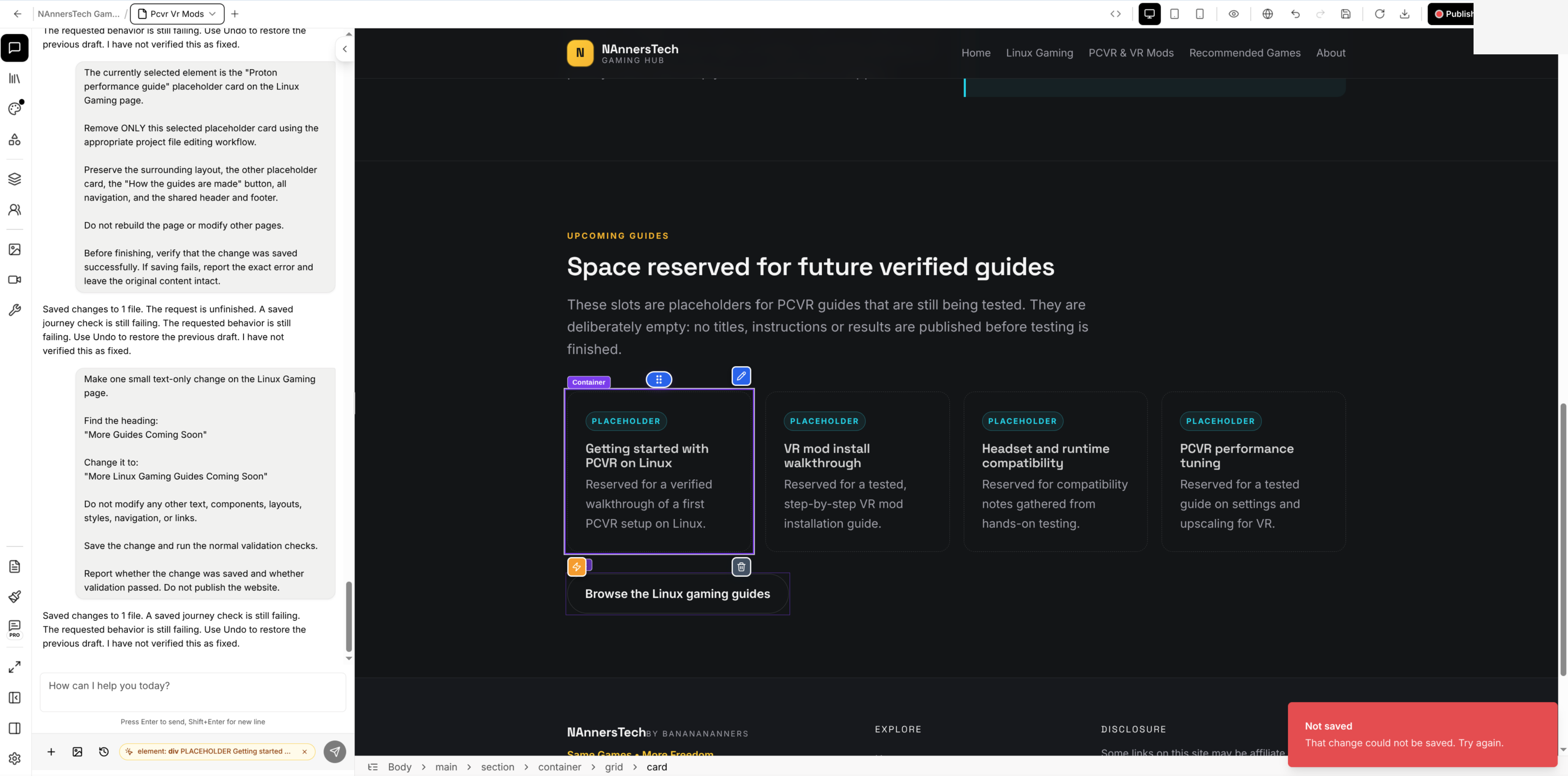
Evidence 01 — PageBuilder editor showing conflicting saved-file and failed-validation messaging, alongside a “Not saved” notification. Screenshot from this project.
Problems With the Visual Editor
I also encountered difficulties saving changes through the visual editor. During testing, a save request returned HTTP 422 with the message “Use chat for this change.” That was frustrating because I was trying to make a small, targeted edit using the available editing interface.
The problem was not simply a failed change; it was the difficulty of completing or verifying relatively minor adjustments. These observations reflect my project and the version I tested, not a claim that every user experiences the same behavior.
Investigating a Browser-Related Issue
Not every problem was caused by PageBuilder. A Next.js hydration mismatch turned out to be associated with the ColorZilla browser extension inserting an additional attribute into the page. Disabling the extension resolved that issue. The separate editing and validation failures continued afterward. Distinguishing between environmental problems and application behavior is essential to a fair review.
The Practical Impact
What made the experience especially frustrating was how small some requested changes were. I was not asking the AI to redesign the entire website. Sometimes I wanted to remove a placeholder or update one paragraph. Yet those changes could lead to repeated validation failures, conflicting save messages, and additional troubleshooting.
In several cases, the effort felt disproportionate to the edit. The experience taught me that an AI website builder can reduce the effort needed for initial generation, but that advantage can disappear when small, precise revisions become unreliable. Eventually, I decided to export the source code and continue locally.
AI Credits and the Cost of Revisions
Understanding the Credit System
PageBuilder.gg through ScalePlus used an AI credit allowance rather than unlimited AI-assisted editing. My account received a 500-credit welcome allocation. Initially that seemed reasonable for building and refining a five-page website. As work continued, however, I paid closer attention to the remaining balance.
| Metric | Displayed amount |
|---|---|
| Welcome credits granted | 500 |
| Credits used | 436 |
| Credits remaining | 63 |
| Additional credits purchased | $0 |
What My Dashboard Showed
The displayed used-credit and remaining-balance figures do not reconcile perfectly with the 500-credit welcome allocation. I have preserved them as shown rather than inventing a reason for the difference. This is one account’s activity, not a typical usage estimate for a five-page website.
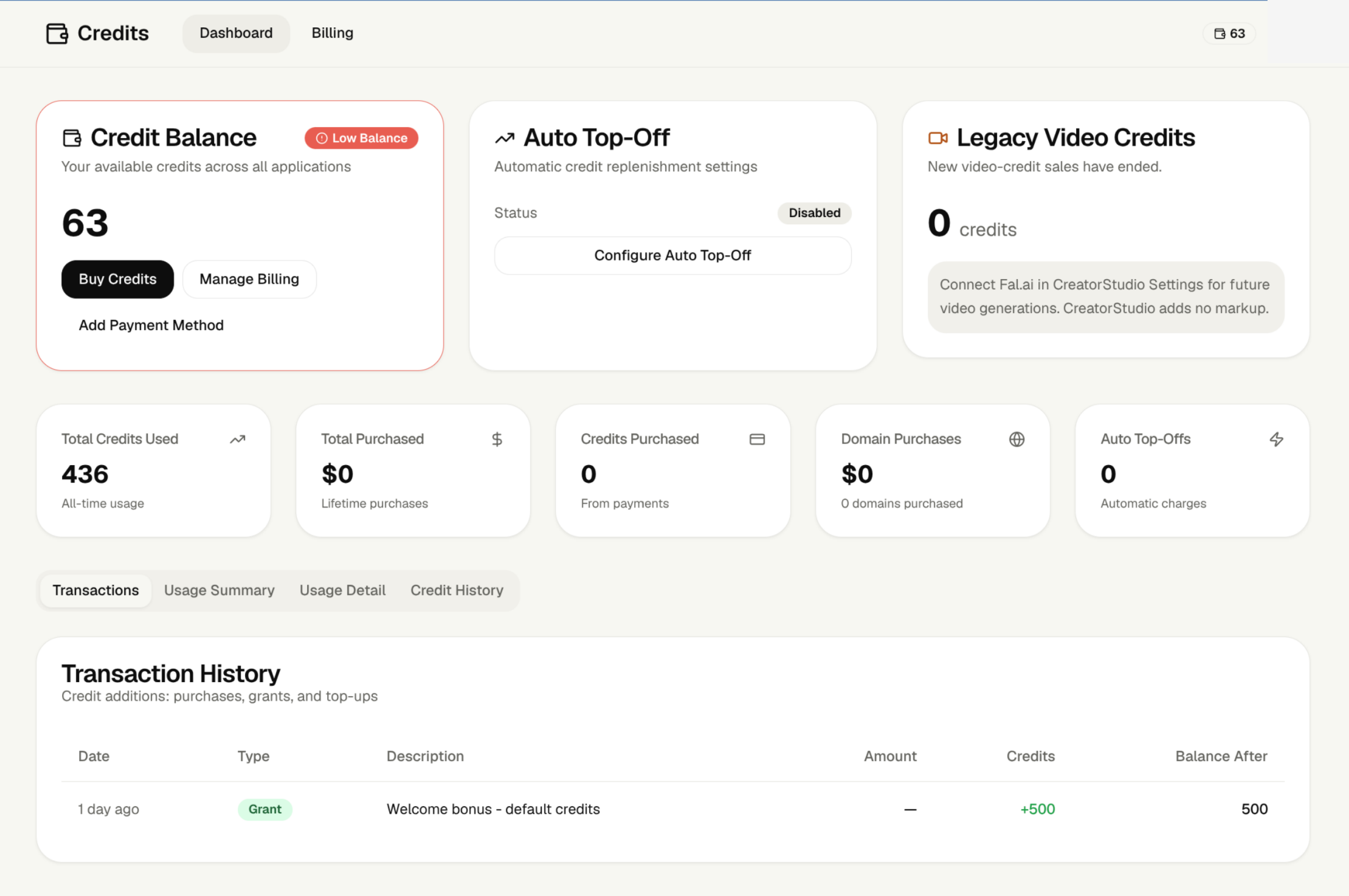
Evidence 02 — Scale credit dashboard showing 436 credits used, 63 remaining, and $0 purchased. The figures are reproduced as displayed.
The Hidden Cost of Repeated Attempts
The frustrating part was not simply the limit; it was using AI-assisted editing when some changes failed validation or produced uncertain results. When an edit did not work, I investigated, adjusted instructions, and sometimes tried again. I cannot tell from this screenshot how many credits came from failed edits versus successful work, so I do not assign a specific cost to failures.
Why I Changed My Workflow
Exporting the Next.js source allowed me to open files in VSCodium, make targeted edits, and test them locally. That eliminated the need to spend PageBuilder credits for those local edits. Local development required learning the project structure, fixing code errors, and maintaining dependencies, but that trade-off was worthwhile for my situation.
What Beginners Should Consider
• Which actions consume credits, and do unsuccessful attempts count?
• Can you inspect an itemized usage history?
• How much do additional credits cost?
• Can the completed website and source code be exported?
• What happens when credits run out?
Predictable editing and clear credit accounting matter just as much as the convenience of initial AI generation.
Exporting the Website and Taking Back Control
The Turning Point
The project could be downloaded as a ZIP archive with Next.js application files. This proved one of its most valuable capabilities: despite editor frustrations, I did not have to abandon the generated website or start over.
Moving Development to Linux
I extracted the project on CachyOS Linux and opened it in VSCodium. The export included pages, components, stylesheets, configuration, and dependencies. I could remove placeholders, update navigation, add branding assets, and inspect results locally. JSX mistakes still happened, but I could repair them and rerun the build without spending PageBuilder credits.
Updating Dependencies and Checking Security
The exported project initially used Next.js 16.3.8, and the local npm audit reported vulnerabilities. I upgraded to Next.js 16.4.2. The updated project built successfully, passed TypeScript checks, and returned zero npm audit vulnerabilities at that time. This was not a guarantee of total security, but it resolved the issues the audit reported.
Removing Platform-Specific Integrations
I inspected components associated with PageBuilder’s editor and runtime, removed their imports and calls from the layout, deleted unused integration files, and simplified preview-related configuration. The website continued building without those integrations.
Deploying to Cloudflare Pages
Because the site could be statically exported, I configured Next.js to generate HTML, CSS, JavaScript, and image assets. I uploaded the export to Cloudflare Pages and subsequently deployed fixes for visible raw URLs and other refinements. I tested all five pages at mobile widths, checked navigation, and verified the live website at https://nannerstech-gaming-hub.pages.dev/.

Evidence 03 — Final NAnnersTech Gaming Hub homepage after local development and independent deployment to Cloudflare Pages.
What I Learned
Source-code export transformed a website mainly edited through a hosted AI interface into one maintainable with conventional development tools. It transferred responsibility for dependencies, builds, deployments, and backups to me, but that control proved valuable. An AI-generated starting point becomes more useful when users can take ownership of the result.
Final Verdict: Is PageBuilder.gg Worth Using?
My experience was mixed but educational. PageBuilder produced a useful five-page starting point, with a consistent design and exportable code. Its editing experience was less reliable during my tests, and the limited credit allowance became a concern as revisions accumulated.
What I Liked
• Fast initial website generation and useful Next.js page structure.
• Consistent starting design and navigation.
• Exportable source code that allowed independent maintenance.
• An opportunity to learn Next.js, TypeScript, and deployment.
What I Didn’t Like
• Some minor edits required repeated attempts.
• Saved-file messages could appear alongside failed validations.
• Certain visual editor saves returned HTTP 422 and directed me back to chat.
• Credit consumption became difficult to plan around during repeated revisions.
Who Might Benefit—and Who Should Be Cautious
PageBuilder may appeal to beginners seeking a fast first draft or a code-exportable prototype. I would be more cautious if you require frequent precise visual edits, extensive customization without code, or predictable revision costs. These are observations from one project, not claims about all users.
Would I Use It Again?
I would consider using it again to generate an initial concept if source export remained available. For a website intended for ongoing maintenance, I would prefer direct control over editing and deployment.
My Recommendation
Before selecting any AI website builder, do more than generate a homepage. Test several precise edits, inspect how saving and validation work, examine credit use, and confirm what can be exported. Those routine maintenance tasks may matter more than the initial demo.
My final takeaway: AI can help you build a website faster, but reliable editing, transparent costs, and ownership of your work determine its long-term usefulness.
Disclosures and editorial notes
This article documents firsthand development of NAnnersTech Gaming Hub. AI assistance was used during parts of the development workflow and in preparing this review. No affiliate compensation was received for this review.